Zipper Lock HD - HQ Wallpaper
Amazic Fun HubPersonalization
4.2132.00 Reviews
- Version
- 1.0.8
- Installs
- 10.00M
- Age Rating
- Everyone
Screenshots
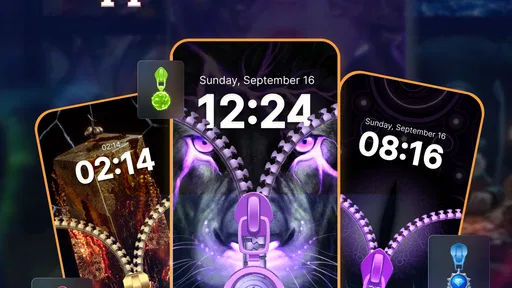
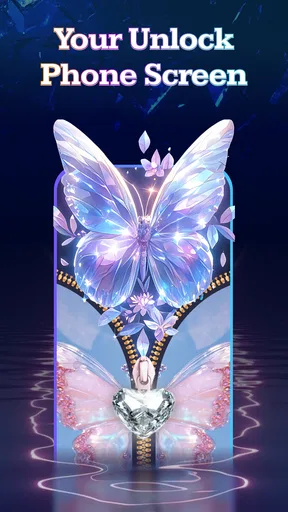
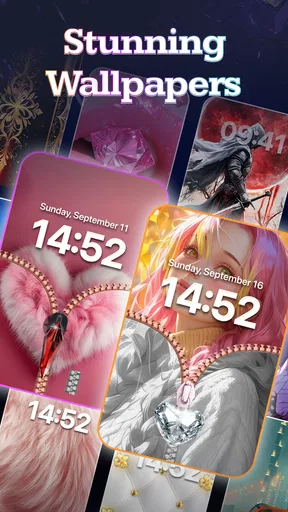
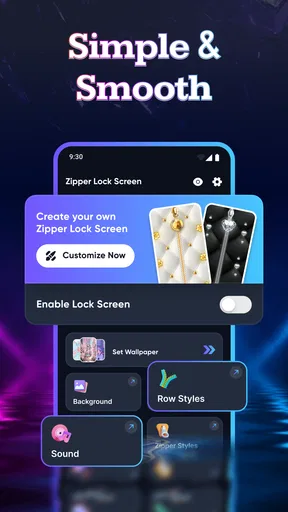
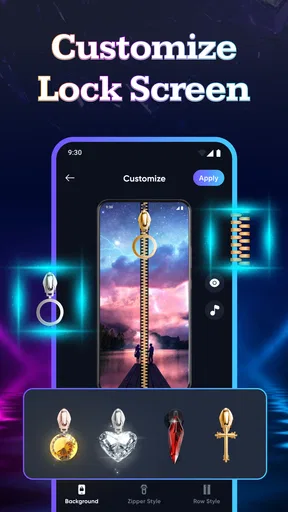
Our Review of Zipper Lock HD - HQ Wallpaper
 Analysis by Appyee
I like the idea of changing an ordinary lock screen into a small moment of interaction, and this app is built around exactly that. Zipper Lock Screen: Zip Theme gives your phone a playful, tactile-looking way to unlock it, with the zipper animation as the main attraction. It is less about changing how a phone works and more about making a familiar action feel a little more personal.
What to expect from the zipper effect
The key question is whether a decorative lock screen can fit naturally into a routine you repeat throughout the day. A zipper effect is immediately understandable, but it adds a step compared with simply swiping or using a device’s standard unlock shortcut. If you enjoy the small flourish, that extra interaction can feel charming; if you unlock your phone constantly while multitasking, it may start to feel like an interruption.
I would think of this as a visual personalization app rather than a replacement for every part of your phone’s built-in lock experience. Before settling on a theme, check how the app behaves alongside your usual screen lock and security settings. The practical aim is to enjoy the zipper presentation without assuming it changes the underlying security method your device relies on.
Where the novelty earns its keep
The effect makes most sense when you treat it as a bit of character for your device, not as a productivity feature. If you enjoy themed phone layouts, a zipper can be a fun finishing touch; it can also give a child or a friend a more memorable first look at your screen, provided you are comfortable letting them see your phone. For a work phone, a discreet design may fit better than a bright, attention-grabbing one.
A useful way to judge the animation is to try it during a normal day rather than only testing it once. Unlock your phone when you are heading out, checking a message, or moving between tasks. If the gesture still feels satisfying after those repeated moments, the novelty is working for you. If you find yourself wishing you could skip it, that is a good sign to return to a simpler lock-screen setup.
Style choices and their trade-offs
Personalization is the point here, but the most eye-catching option is not automatically the easiest to live with. A busy background or a strong zipper color can make the screen feel lively, while a restrained combination is less likely to compete visually with notifications and other lock-screen information. I would start with a theme that keeps the zipper easy to see without making the entire screen feel crowded.
There is also a practical trade-off between a distinctive look and a clean, glanceable display. If you regularly check notifications without unlocking, choose a design that leaves the information easy to read. If you mainly unlock to open an app, you may care more about the animation’s feel than about how the lock screen looks at a glance. This is a small choice, but it helps the theme serve your habits instead of getting in their way.
How it compares with simpler alternatives
Most phones already offer standard wallpapers and built-in lock-screen styles. Those options are usually the better fit if you want a dependable, understated screen with no extra flourish. A zipper theme is for someone who specifically wants unlocking to look playful and different, rather than someone looking for a broad set of phone-wide design changes.
That distinction matters because the zipper is the central idea, not just one detail in a general customization toolkit. If your goal is to coordinate icons, widgets, and multiple screens, a launcher or your phone’s own personalization tools may suit you better. If you want a recognizable visual twist at the lock screen, this app has a clearer purpose.
Who will enjoy it—and who may not
I can see this appealing to people who like changing their phone’s appearance, enjoy animated details, or want a lock screen that feels less conventional. It is also a low-commitment experiment for someone who wants to try a more playful look before deciding whether to keep it. Those who value the fastest possible unlock, a minimal interface, or a businesslike appearance may find the effect unnecessary.
For example, imagine checking a shopping list while carrying bags: a longer unlocking gesture may be less welcome when one hand is occupied. At home, when you have a moment to enjoy the animation, the same gesture can feel like a pleasant bit of personality. That difference is why I would judge the app by the situations in which you use your phone, not just by how attractive a theme looks in a preview.
Unzipping the Basics
So, what exactly does Zipper Lock Screen: Zip Theme offer? Well, as the name suggests, it transforms your lock screen into a zipper. Yup, you read that right. You’ll literally unzip your phone to unlock it! It’s a simple concept, but sometimes the simplest ideas pack the most punch. The app provides a variety of zipper styles and themes so you can customize the look to match your mood or aesthetic. From funky colors to elegant designs, there’s something for everyone.
Setting It Up
Getting started is a breeze. Once you download and install the app, you just need to select your preferred theme and voila! Your phone is now equipped with a zipper lock screen. The interface is pretty straightforward, even if you’re not the most tech-savvy person out there. Just follow the on-screen instructions, and you’re good to go.
The Fun Factor
Let’s be honest, having a zipper to unlock your phone is just plain fun. It’s a conversation starter, for sure. Friends and family will be intrigued the first time they see you unzip your screen. Plus, it adds a layer of personalization that can make your phone feel truly yours. In a world where every smartphone looks the same, this little touch of uniqueness is refreshing.
Performance and Usability
In terms of performance, the app runs smoothly without any noticeable lag. It doesn’t seem to bog down the phone’s performance, which is a major plus. After all, nobody wants to sacrifice speed for style. The app also integrates well with your existing phone security, so you don’t have to worry about compromising your device’s safety.
Customization Options
This app is all about customization. You can choose from different zipper types and backgrounds, and even adjust the speed of the zipper animation. Want a bright and bold pink zipper? Done. Prefer a more subtle black and white theme? No problem. The options are pretty extensive, allowing you to tailor the look exactly how you like it.
Is It for Everyone?
While Zipper Lock Screen: Zip Theme is a fun and unique app, it might not be for everyone. If you’re someone who prefers a more traditional or minimalist look, this might not be your cup of tea. But if you love quirky, customizable features, then this app is right up your alley. It’s perfect for those who enjoy personalizing every aspect of their phone.
On the practical side, if you’re often in a rush and need to unlock your phone quickly, the zipper animation could take a bit more time than a regular swipe. It’s something to keep in mind if speed is a priority for you.
Performance in everyday use
My performance verdict is deliberately modest: the appeal is the visible zipper interaction, not a promise that your phone will feel faster or that every device will behave identically. The app is a free personalization app from Amazic Fun Hub, currently at version 1.0.7, and its audience is broad, but the way a lock-screen customization feels can depend on the phone and its existing settings. I would try it on the device you actually use rather than judging it only by the idea.
If the animation appears reliably when you wake the screen, the effect can become part of your routine. If it occasionally feels out of step with your normal unlock flow, first check whether the phone’s own lock settings are taking precedence, then decide whether the extra visual touch is worth adjusting your habits for. I would not choose it on the assumption that it replaces built-in security; keep your familiar device protection in place and treat the zipper as a presentation layer.
Stability, resources, and a sensible fallback
For a lightweight visual change, the sensible expectation is that the app should not become the center of your phone use. Pay attention to how it feels after several unlocks, not just the first one: does the screen appear when you expect it, is the animation comfortable, and can you still reach what you need without fumbling? Those practical checks tell you more than a quick novelty test.
If the lock screen ever stops matching your routine, you do not need to force yourself to keep using it. Return to the simpler built-in option and see whether your phone feels more predictable. That is a useful fallback for anyone who depends on quick access, and it keeps the decision low-pressure: the theme is worthwhile only while its personality outweighs its added interaction.
Choosing a theme for real conditions
One small but useful tip is to choose the design in the lighting where you usually check your phone. A bright, detailed theme that looks lively indoors may be harder to glance at outdoors, while a high-contrast zipper can remain visually clear. Try to keep the background calm enough that important lock-screen details do not get lost. The best theme is not necessarily the most elaborate one; it is the one you can read at a glance.
It is also worth thinking about who sees your screen. If you often place your phone on a desk or use it around colleagues, a quieter style can still feel personal without drawing as much attention. If the phone is mostly for your own use, you can choose something bolder. In either case, changing the look is more useful when it reflects where and how you use the device, rather than simply picking the most striking preview.
Is the free app a good fit?
The app is free and rated for Everyone, so it is easy to consider as a casual personalization experiment. It has an average rating of 4.7 from around 6.9 thousand ratings, with 35 written reviews and over 1 million installs. Those figures suggest that many people have tried it, but they cannot tell you whether its particular gesture will suit your pace or the way your phone is configured. I would use them as context, not as a substitute for a few days of personal testing.
Its release date is January 8, 2026, and it requires Android 7.0 or later. That makes checking your device’s Android version a practical first step before you plan around it. If you use a phone that meets the minimum requirement, consider whether you are comfortable adding a themed interaction to the lock screen. Someone seeking a whole-device makeover, a strictly minimal appearance, or the quickest possible access may be happier with built-in wallpaper and lock-screen controls instead.
How I would decide after trying it
I would give the zipper theme a short, ordinary trial: use it during the kinds of moments when you normally unlock your phone, including when you are in a hurry and when you have time to enjoy the effect. Keep the design readable, avoid changing too many visual choices at once, and notice whether the animation feels like a pleasant detail or a repeated delay. That simple comparison makes it easier to separate first-day amusement from lasting usefulness.
Overall, Zipper Lock Screen: Zip Theme is a delightful little app that adds a bit of personality to your phone. It’s easy to use, doesn’t affect performance, and offers a high level of customization. Whether you’re looking to impress your friends or just want a bit of fun every time you unlock your phone, this app is worth checking out. So go ahead, give it a try, and start zipping your way to a more personalized smartphone experience!
Verdict
Strengths of Zipper Lock HD - HQ Wallpaper
- Unique and creative lock screen design.
- Variety of themes and customization options.
- Easy to use with intuitive interface.
- Lightweight app with minimal battery usage.
- Supports sound effects for added fun.
Limitations of Zipper Lock HD - HQ Wallpaper
- Contains ads which may interrupt use.
- Limited functionality beyond lock screen.
- Some themes may not suit all tastes.
- Occasional bugs with zipper animation.
- No advanced security features included.
Similar Picks in This Category
View All
Microsoft SwiftKey AI Keyboard
SwiftKey4.3

Wallpapers
Google LLC4.1

Zedge™ Wallpapers & Ringtones
Zedge4.7

Yandex Browser with Alice AI
Direct Cursus Computer Systems Trading LLC4.3

Ringtone Maker:create ringtone
Big Bang Inc.4.7

Fonts Keyboard
Fonts Keyboard3.9
Frequently Asked Questions
What is Zipper Lock Screen: Zip Theme and how does it work?
Zipper Lock Screen: Zip Theme is a fun and interactive application that allows users to customize their phone’s lock screen with a zipper effect. Users can choose from various themes and styles, giving their device a unique look. To unlock the screen, simply swipe the zipper down, mimicking the action of unzipping.
Is Zipper Lock Screen: Zip Theme safe to use on my device?
Yes, Zipper Lock Screen: Zip Theme is safe to use. It does not access or modify your personal data or sensitive information. However, it’s always recommended to download apps from official app stores and check user reviews and permissions before installation to ensure the security of your device.
Does Zipper Lock Screen: Zip Theme consume a lot of battery?
Zipper Lock Screen: Zip Theme is designed to be lightweight and efficient, minimizing its impact on your device’s battery life. While any app running in the background may use some power, this app is optimized to ensure it doesn’t significantly drain your battery.
Can I customize the themes in Zipper Lock Screen: Zip Theme?
Absolutely! Zipper Lock Screen: Zip Theme offers a variety of customizable options. Users can choose from different zipper styles, colors, and background images. This allows for a personalized lock screen experience that reflects your individual taste and style preferences.
Is Zipper Lock Screen: Zip Theme compatible with all devices?
Zipper Lock Screen: Zip Theme is compatible with most Android and iOS devices. However, it’s important to check the app’s specifications and requirements on the app store to ensure compatibility with your specific device model and operating system version before downloading.
